Does Backend Feel Like Magic to You?
A practical, step-by-step way to learn how a backend works by building a Node.js server.
Have you ever wondered what actually happens when you open a URL like:
http://localhost:3000/users
You press Enter, and somehow data appears. It feels instant. Almost magical.
But inside the server, something very simple is happening. A request comes in, the server decides what to do, and then it responds.
Let’s build this together, and this time, let’s test everything properly in Postman so it never feels like a black box.
\
Step 1: Create a basic server
Create a file called server.js and start with this:
const http = require("http");

const server = http.createServer((req, res) => {
  res.end("Hello from server");
});

server.listen(3000, () => {
  console.log("Server running on http://localhost:3000");
});
Step 2: Add routing
Right now, your server responds the same way to every request. It is like someone who gives the same answer no matter what you ask. That isn’t very useful, is it?
That’s where routing comes in.
Instead of responding blindly, let’s make the server decide what to do:
const http = require("http");

const server = http.createServer((req, res) => {
  // NEW: add routing logic
  if (req.method === "GET" && req.url === "/users") {
    res.end("Here are your users");
  } else {
    res.end("I don't understand this request");
  }
});

server.listen(3000, () => {
  console.log("Server running on http://localhost:3000");
});
Now the server behaves differently based on the request. That decision-making is routing.
Step 3: Return JSON data
Let’s make it more realistic by returning actual data:
const http = require("http");

// NEW: sample data
const users = [
  { id: 1, name: "Alice" },
  { id: 2, name: "Bob" }
];

const server = http.createServer((req, res) => {
  if (req.method === "GET" && req.url === "/users") {
    // NEW: return JSON
    res.setHeader("Content-Type", "application/json");
    res.end(JSON.stringify(users));
  } else {
    res.end("I don't understand this request");
  }
});

server.listen(3000, () => {
  console.log("Server running on http://localhost:3000");
});
Now /users returns structured data. You have built a simple API.
Test it in Postman
Make sure your server is running. In your terminal, run node server.js.
- Open Postman and click New, then HTTP.
- Keep the method as GET.
- Enter
http://localhost:3000/usersin the address box. - Click Send.
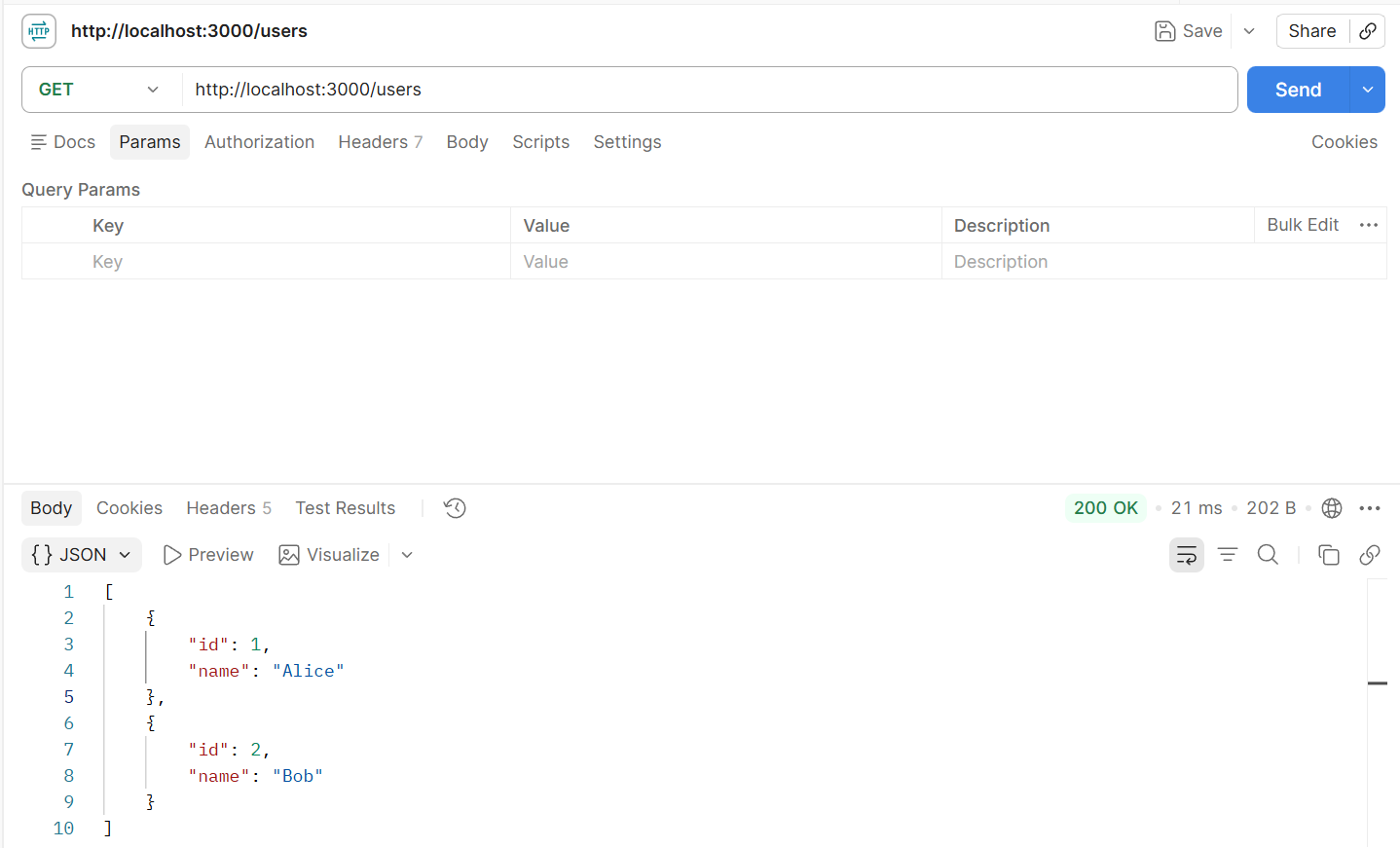
You should see your two users and a 200 OK status. That's your first API response, tested the way a developer would test it.
Step 4: Handle a POST request
Now think of a different situation. Instead of asking for data, you want to send data.
Like telling a waiter: “Add one more coffee.”
That is a POST request.
Let’s extend the same code:
const http = require("http");

const users = [
  { id: 1, name: "Alice" },
  { id: 2, name: "Bob" }
];

const server = http.createServer((req, res) => {
  if (req.method === "GET" && req.url === "/users") {
    res.setHeader("Content-Type", "application/json");
    res.end(JSON.stringify(users));
  }

  // NEW: handle POST request
  else if (req.method === "POST" && req.url === "/users") {
    res.end("POST request received");
  }

  else {
    res.end("I don't understand this request");
  }
});

server.listen(3000, () => {
  console.log("Server running on http://localhost:3000");
});
The server now recognizes the POST request. But it still does not read the data being sent.
Step 5: Read the request body
Here’s the important part: Node doesn’t give you the request body all at once. It arrives in small pieces called chunks.
So you collect it, like this:
const http = require("http");

const users = [
  { id: 1, name: "Alice" },
  { id: 2, name: "Bob" }
];

const server = http.createServer((req, res) => {
  if (req.method === "GET" && req.url === "/users") {
    res.setHeader("Content-Type", "application/json");
    res.end(JSON.stringify(users));
  }

  else if (req.method === "POST" && req.url === "/users") {
    // NEW: collect incoming data
    let body = "";

    req.on("data", chunk => {
      body += chunk;
    });

    // NEW: when all data is received
    req.on("end", () => {
      console.log("Received:", body);
      res.end("Data received");
    });
  }

else {
    res.end("I don't understand this request");
  }
});

server.listen(3000, () => {
  console.log("Server running on http://localhost:3000");
});
Step 6: Turn the body into JSON
Now the server receives the full request body. But it is still a string.
Let’s convert it into usable data:
const http = require("http");

const users = [
  { id: 1, name: "Alice" },
  { id: 2, name: "Bob" }
];

const server = http.createServer((req, res) => {
  if (req.method === "GET" && req.url === "/users") {
    res.setHeader("Content-Type", "application/json");
    res.end(JSON.stringify(users));
  }

  else if (req.method === "POST" && req.url === "/users") {
    let body = "";

    req.on("data", chunk => {
      body += chunk;
    });

    req.on("end", () => {
      console.log("Received:", body);

      // NEW: convert to JSON
      const parsed = JSON.parse(body);
      console.log(parsed);

      res.end("Data received");
    });
  }

  else {
    res.end("I don't understand this request");
  }
});

server.listen(3000,() => {
  console.log("Server running on http://localhost:3000");
});
Now you can access values like parsed.name.
This process is called body parsing.
Step 7: Move parsing into a Promise
The POST block is now doing too much. Let’s move that logic into a separate function and improve readability:
const http = require("http");

const users = [
  { id: 1, name: "Alice" },
  { id: 2, name: "Bob" }
];

// NEW: reusable body parser
function parseBody(req) {
  return new Promise((resolve, reject) => {
    let body = "";

    req.on("data", chunk => {
      body += chunk;
    });

    req.on("end", () => {
      try {
        const parsed = JSON.parse(body);
        resolve(parsed);
      } catch {
        reject("Invalid JSON");
      }
    });
  });
}

const server = http.createServer((req, res) => {
  if (req.method === "GET" && req.url === "/users") {
    res.setHeader("Content-Type", "application/json");
    res.end(JSON.stringify(users));
  }

  else if (req.method === "POST" && req.url === "/users") {
    // NEW: use Promise-based parsing
    parseBody(req)
      .then(body => {
        console.log(body);
        res.end("Data received");
      })
      .catch(error => {
        res.end(error);
      });
  }

  else {
    res.end("I don't understand this request");
  }
});

server.listen(3000, () => {
  console.log("Server running on http://localhost:3000");
});
Now Promise handles the waiting.
Step 8: Clean it up with async/await
Finally, let’s make it cleaner using async/await:
const http = require("http");

const users = [
  { id: 1, name: "Alice" },
  { id: 2, name: "Bob" }
];

function parseBody(req) {
  return new Promise((resolve, reject) => {
    let body = "";

    req.on("data", chunk => {
      body += chunk;
    });

    req.on("end", () => {
      try {
        const parsed = JSON.parse(body);
        resolve(parsed);
      } catch {
        reject("Invalid JSON");
      }
    });
  });
}

// NEW: async server handler
const server = http.createServer(async (req, res) => {
  if (req.method === "GET" && req.url === "/users") {
    res.setHeader("Content-Type", "application/json");
    res.end(JSON.stringify(users));
  }

  else if (req.method === "POST" && req.url === "/users") {
    try {
      // NEW: wait for body
      const body = await parseBody(req);
      console.log(body);

      res.end("Data received");
    } catch (error) {
      res.end(error);
    }
  }

  else {
    res.end("I don't understand this request");
  }
});

server.listen(3000, () => {
  console.log("Server running on http://localhost:3000");
});
Test it in Postman
With your server still running:
In Postman, change the method from GET to POST.
Keep the address as
http://localhost:3000/users.Click the Body tab, select raw, and choose JSON.
Enter {"name": "Charlie"} and click Send.
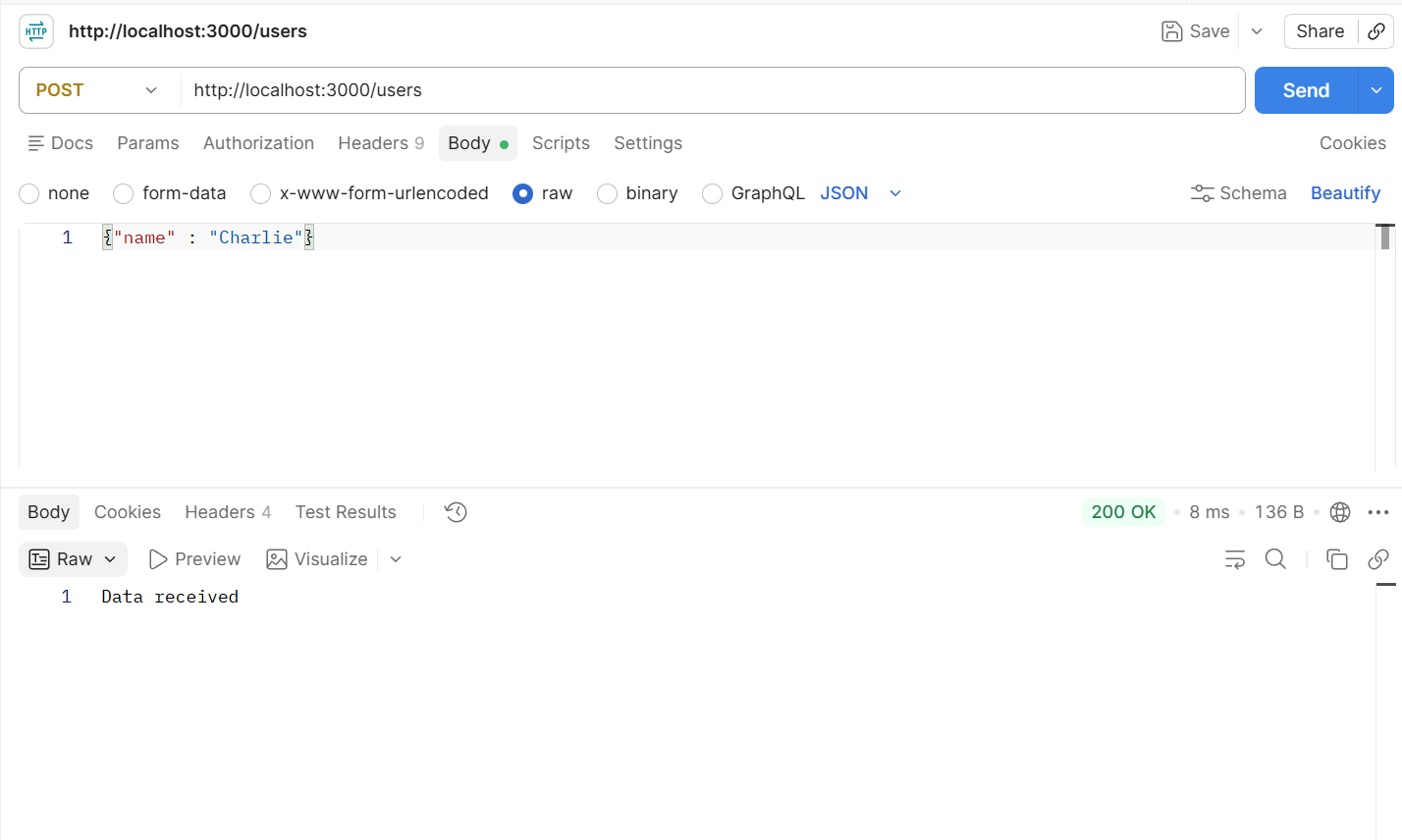
Postman shows "Data received". Now look at your terminal:
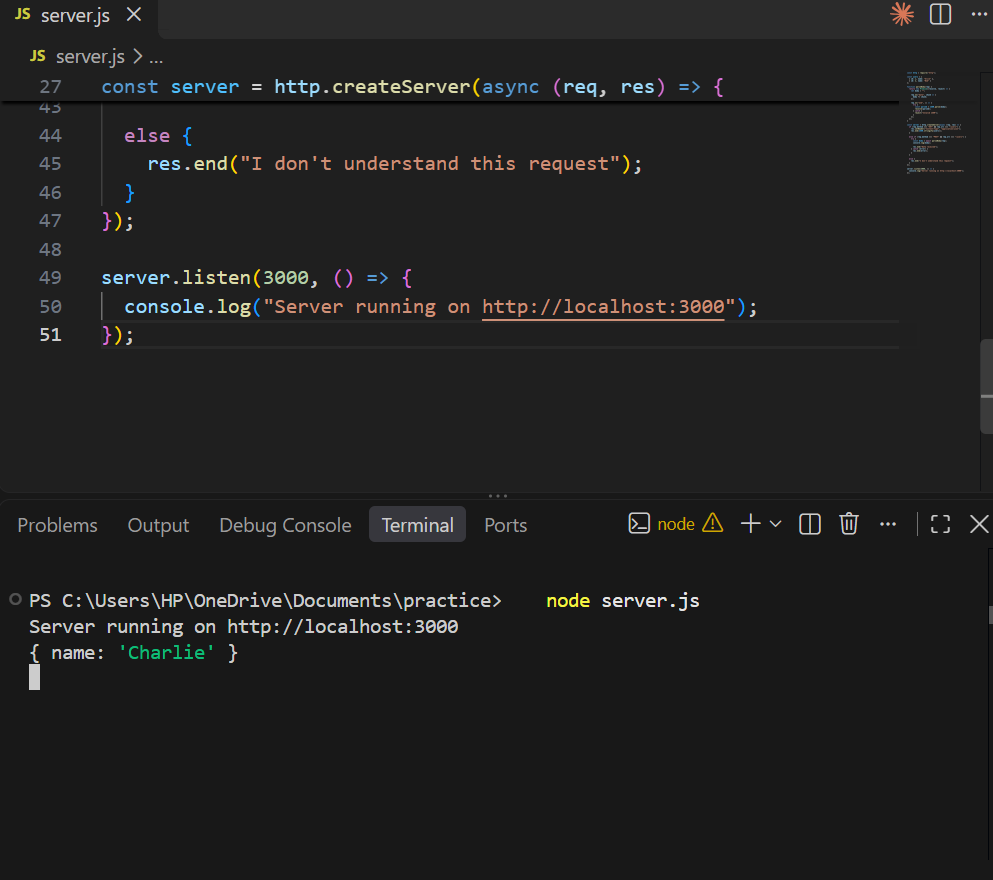
Your server printed { name: 'Charlie' }. It received the data, read it, and turned it into an object your code can use.
What you just built
Now the flow is very clear:
1. A request comes in
2. Routing decides what to do
3. Body parsing collects data
4. Promise manages waiting
5. Async/await makes it readable
6. Response is sent
And just like that, the backend doesn’t feel like magic anymore.
What's next
Right now, your server reads the new user but doesn't save it. Try these on your own:
- Add the new user to the users array, then send a GET request in Postman to see it in the list.
- Send back a clear status code, like 201 Created when a user is added, or 404 Not Found when the route doesn't exist.
- Rebuild the same server with Express, a popular Node.js framework, and see how much shorter the code gets.
Take one step at a time, test each change in Postman, and you'll understand the backend from the inside out.
Comments
Join the discussionNo comments yet. Be the first to comment.